
Gantt renders scheduled work on a timeline. Use it for delivery plans, implementation roadmaps, release windows, and any task list that needs dates, progress, grouping, and optional parent-child expansion.
Python Contract
sdk.ui.Gantt(
    id: str,
    *,
    items: list[dict[str, Any]] | None = None,
    mermaid: str = "",
    title: str = "",
    height: int = 360,
    start: str = "",
    end: str = "",
    scale: str = "1d",
)
height is normalized to at least 220. scale defaults to the daily scale (1d).
Supported Properties
| Property | Type | Required | Python | YAML | Desktop | Web | Notes |
|---|---|---|---|---|---|---|---|
id |
str |
yes | yes | yes | yes | yes | Stable component id |
items |
list[object] |
no | yes | yes | yes | yes | Structured Gantt rows |
mermaid |
str |
no | yes | yes | yes | yes | Mermaid gantt definition |
title |
str |
no | yes | yes | yes | yes | Optional heading above the timeline |
height |
int |
no | yes | yes | yes | yes | Minimum visible height |
start |
str |
no | yes | yes | yes | yes | Explicit timeline start date or datetime |
end |
str |
no | yes | yes | yes | yes | Explicit timeline end date or datetime |
scale |
str |
no | yes | yes | yes | yes | Timeline scale. Defaults to 1d |
style |
str |
no | yes | yes | yes | yes | Apply layout styling on the surrounding container when possible |
show_if |
rule | no | yes | yes | yes | yes | Generic visibility contract |
hide_if |
rule | no | yes | yes | yes | yes | Generic visibility contract |
required_permissions |
list[str] |
no | yes | yes | yes | yes | Generic visibility contract |
Task Shape
Each items entry can provide:
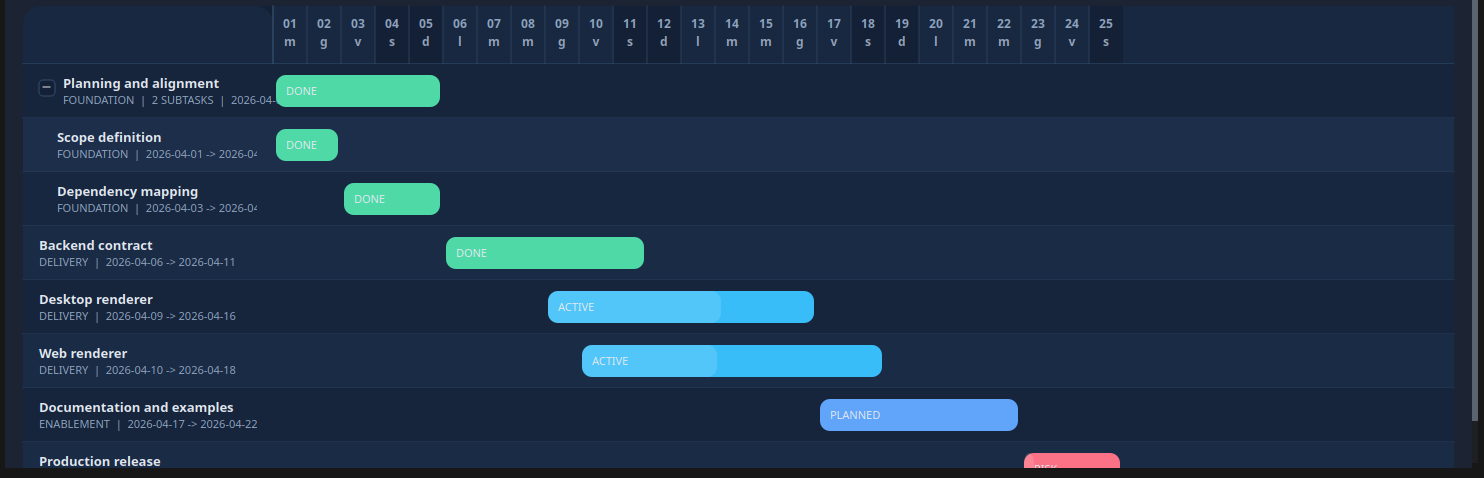
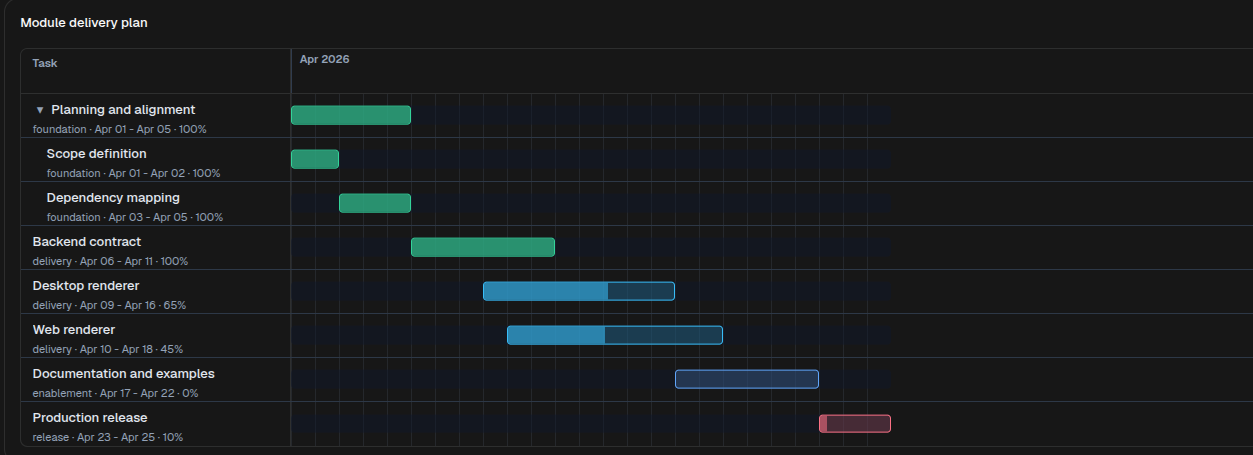
id: stable task identifierlabel: visible task labelname: accepted as a label aliasstart: start date or datetimeend: end date or datetimegroup: lane or section label shown with the taskstatus: task state used for bar stylingstatus_label: optional label shown inside the task bar; defaults tostatusprogress: completion percentage from0to100expanded: initial expanded state for parent taskssubtasks: nested child taskschildren: accepted as an alias forsubtasks
Parent tasks can omit start and end when those dates should be derived from their child tasks.
Timeline Scale
scale controls the timeline unit for every client. When omitted, the component uses the daily scale (1d) and keeps the historical date-only behavior.
Supported values:
1d,1h,1m,1s,1ms- Multiples such as
7d,6h,15m,5s,100ms - Aliases:
day,hour,minute,second,millisecond
When scale is daily, renderers normalize dates to midnight. With sub-daily scales, start and end can use ISO datetime values, for example 2026-04-01T09:30:00.000.
Authoring Modes
Gantt supports two input modes.
- Structured mode with
items - Mermaid mode with a
ganttdefinition inmermaid
When items is present and non-empty, the structured task list is rendered. When items is omitted or empty, the component reads the Mermaid definition.
Structured Example
timeline = sdk.ui.Gantt(
    "module_delivery_plan",
    title="Module delivery plan",
    items=[
        {
            "id": "plan",
            "label": "Planning and alignment",
            "group": "foundation",
            "start": "2026-04-01",
            "end": "2026-04-05",
            "status": "done",
            "progress": 100,
            "expanded": True,
            "subtasks": [
                {
                    "id": "scope",
                    "label": "Scope definition",
                    "group": "foundation",
                    "start": "2026-04-01",
                    "end": "2026-04-02",
                    "status": "done",
                    "progress": 100,
                },
                {
                    "id": "dependencies",
                    "label": "Dependency mapping",
                    "group": "foundation",
                    "start": "2026-04-03",
                    "end": "2026-04-05",
                    "status": "done",
                    "progress": 100,
                },
            ],
        },
        {
            "id": "api",
            "label": "Backend contract",
            "group": "delivery",
            "start": "2026-04-06",
            "end": "2026-04-11",
            "status": "done",
            "progress": 100,
        },
        {
            "id": "desktop",
            "label": "Desktop renderer",
            "group": "delivery",
            "start": "2026-04-09",
            "end": "2026-04-16",
            "status": "active",
            "progress": 65,
        },
        {
            "id": "web",
            "label": "Web renderer",
            "group": "delivery",
            "start": "2026-04-10",
            "end": "2026-04-18",
            "status": "active",
            "progress": 45,
        },
        {
            "id": "docs",
            "label": "Documentation and examples",
            "group": "enablement",
            "start": "2026-04-17",
            "end": "2026-04-22",
            "status": "planned",
            "progress": 0,
        },
        {
            "id": "launch",
            "label": "Production release",
            "group": "release",
            "start": "2026-04-23",
            "end": "2026-04-25",
            "status": "risk",
            "progress": 10,
        },
    ],
    start="2026-04-01",
    end="2026-04-25",
    scale="1d",
    height=480,
)
- kind: Gantt
id: module_delivery_plan
title: "Module delivery plan"
start: "2026-04-01"
end: "2026-04-25"
scale: "1d"
height: 480
items:
- id: plan
label: "Planning and alignment"
group: foundation
start: "2026-04-01"
end: "2026-04-05"
status: done
progress: 100
expanded: true
subtasks:
- id: scope
label: "Scope definition"
group: foundation
start: "2026-04-01"
end: "2026-04-02"
status: done
progress: 100
- id: dependencies
label: "Dependency mapping"
group: foundation
start: "2026-04-03"
end: "2026-04-05"
status: done
progress: 100
- id: api
label: "Backend contract"
group: delivery
start: "2026-04-06"
end: "2026-04-11"
status: done
progress: 100
- id: desktop
label: "Desktop renderer"
group: delivery
start: "2026-04-09"
end: "2026-04-16"
status: active
progress: 65
- id: web
label: "Web renderer"
group: delivery
start: "2026-04-10"
end: "2026-04-18"
status: active
progress: 45
- id: docs
label: "Documentation and examples"
group: enablement
start: "2026-04-17"
end: "2026-04-22"
status: planned
progress: 0
- id: launch
label: "Production release"
group: release
start: "2026-04-23"
end: "2026-04-25"
status: risk
progress: 10Desktop rendering:
Web rendering:
Mermaid Example
timeline = sdk.ui.Gantt(
    "delivery_rollout_mermaid",
    mermaid=\"\"\"
gantt
    title Delivery rollout
    dateFormat YYYY-MM-DD
    section Foundation
    Planning and alignment :done, plan, 2026-04-01, 5d
    section Delivery
    Backend contract       :done, api, after plan, 6d
    Desktop renderer       :active, desktop, after api, 8d
    Web renderer           :active, web, 2026-04-10, 9d
    section Release
    Production release     :crit, launch, after web, 3d
\"\"\",
    height=420,
)
- kind: Gantt
id: delivery_rollout_mermaid
height: 420
mermaid: |
gantt
title Delivery rollout
dateFormat YYYY-MM-DD
section Foundation
Planning and alignment :done, plan, 2026-04-01, 5d
section Delivery
Backend contract :done, api, after plan, 6d
Desktop renderer :active, desktop, after api, 8d
Web renderer :active, web, 2026-04-10, 9d
section Release
Production release :crit, launch, after web, 3dBinding And Runtime Updates
items, title, start, end, and scale can be bound to the page store or to the surface data model. Direct runtime updates should target the same properties with propertyUpdate.
from democrai.sdk.ui import bound

timeline = sdk.ui.Gantt("components_test_gantt_store", height=320)
timeline.set_property(
    "title",
    bound.store("/components_test/gantt/title", scope="page", default="Delivery plan"),
)
timeline.set_property(
    "items",
    bound.store("/components_test/gantt/items", scope="page", default=[]),
)
timeline.set_property(
    "start",
    bound.store("/components_test/gantt/start", scope="page", default="2026-04-01"),
)
timeline.set_property(
    "end",
    bound.store("/components_test/gantt/end", scope="page", default="2026-04-16"),
)
timeline.set_property(
    "scale",
    bound.store("/components_test/gantt/scale", scope="page", default="1d"),
)

data_timeline = sdk.ui.Gantt("components_test_gantt_data", height=320)
data_timeline.set_property(
    "items",
    bound.data("/components_test/gantt_model/items", default=[]),
)

live_timeline = sdk.ui.Gantt(
    "components_test_gantt_live",
    title="Delivery plan",
    items=[],
    height=320,
).allow("title.set", "items.set", "start.set", "end.set")
- kind: Gantt
id: components_test_gantt_yaml_store
title:
type: store
scope: page
path: /components_test/gantt/title
default: "Delivery plan"
items:
type: store
scope: page
path: /components_test/gantt/items
default: []
start:
type: store
scope: page
path: /components_test/gantt/start
default: "2026-04-01"
end:
type: store
scope: page
path: /components_test/gantt/end
default: "2026-04-16"
scale:
type: store
scope: page
path: /components_test/gantt/scale
default: "1d"
height: 320
- kind: Gantt
id: components_test_gantt_yaml_data
items:
type: data
path: components_test/gantt_model/items
default: []
height: 320
- kind: Gantt
id: components_test_gantt_yaml_live
title: "Delivery plan"
items: []
height: 320
capabilities:
- title.set
- items.set
- start.set
- end.setVisibility And Permissions
show_if and hide_if are evaluated at the first render and when their bound values change. Visibility rules use mode: "AND" by default; declare mode: "OR" when any condition can make the rule pass. required_permissions gates the component on the current user permissions; super and admin roles bypass the permission list.
from democrai.sdk.ui import bound

timeline = sdk.ui.Gantt(
    "components_test_gantt_show_if",
    title="show_if visible",
    items=[],
    height=300,
).set_show_if({
    "mode": "AND",
    "conditions": [{
        "left": bound.store(
            "/components_test/visibility/gantt_show",
            scope="page",
            default=True,
        ),
        "op": "==",
        "right": True,
    }]
})

hidden_timeline = sdk.ui.Gantt(
    "components_test_gantt_hide_if",
    title="hide_if not hidden",
    items=[],
    height=300,
).set_hide_if({
    "mode": "AND",
    "conditions": [{
        "left": bound.store(
            "/components_test/visibility/gantt_hide",
            scope="page",
            default=False,
        ),
        "op": "==",
        "right": True,
    }]
})

permission_timeline = sdk.ui.Gantt(
    "components_test_gantt_required_permissions",
    title="required_permissions gate",
    items=[],
    height=300,
).set_required_permissions(["components.diagram.visibility"])
- kind: Gantt
id: components_test_gantt_yaml_show_if
title: "show_if visible"
items: []
height: 300
show_if:
mode: AND
conditions:
- left:
type: store
scope: page
path: /components_test/visibility/gantt_show
default: true
op: "=="
right: true
- kind: Gantt
id: components_test_gantt_yaml_hide_if
title: "hide_if not hidden"
items: []
height: 300
hide_if:
mode: AND
conditions:
- left:
type: store
scope: page
path: /components_test/visibility/gantt_hide
default: false
op: "=="
right: true
- kind: Gantt
id: components_test_gantt_yaml_required_permissions
title: "required_permissions gate"
items: []
height: 300
required_permissions:
- components.diagram.visibilityRenderer Behavior
Desktop:
- Expands and collapses parent rows in place.
- Uses explicit
startandendwhen provided, otherwise derives the visible range from task dates. - Uses
scalewhen provided, otherwise defaults to1d. - Accepts
subtasksandchildrenfor nested rows. - Accepts
labelandnamefor task labels. - Uses
statusto derive colors and also accepts an explicit taskcolor.
Web:
- Expands and collapses parent rows in place.
- Uses explicit
startandendwhen provided, otherwise derives the visible range from task dates. - Uses
scalewhen provided, otherwise defaults to1d. - Accepts
subtasksandchildrenfor nested rows. - Accepts
labelandnamefor task labels. - Styles bars from the status palette.
Usage Guidance
- Use structured
itemswhen the module already owns tasks as data. - Use Mermaid when the timeline is easier to maintain as a text definition.
- Keep task ids stable when Mermaid tasks use
after <task_id>dependencies. - Use parent rows with
expanded: truewhen the first render should expose subtasks immediately. - Set
startandendwhen multiple timelines must stay visually aligned across cards or surfaces.