Purpose
TreeView renders hierarchical navigation or selection data. Use it for side navigation, nested resource pickers, permission trees, file-like structures, and any UI where users need to expand branches and choose nodes.
The component supports two independent interactions:
- click activation through
click_action, commonly used for navigation - selection through
select_action, used to inspect or act on selected nodes
Constructor
TreeView(
    id: str,
    nodes: Optional[List[Dict[str, Any]]] = None,
    *,
    click_action: Optional[str | ActionSpec] = None,
    select_action: Optional[str | ActionSpec] = None,
    params: Optional[dict] = None,
    expand_all: bool = False,
    click_mode: str = "single",
    selection_mode: str = "single",
    active_id: Optional[str] = None,
)Properties
| Property | Type | Default | Description |
|---|---|---|---|
nodes |
list[dict] |
[] |
Nested node list. |
click_action |
str or ActionSpec |
"" |
Action emitted when a node is activated. Use nav for route navigation. |
select_action |
str or ActionSpec |
"" |
Action emitted after selection changes. |
params |
dict |
{} |
Static context merged into emitted click and selection actions. |
expand_all |
bool |
False |
Expands all branches on render. |
click_mode |
single, double, none |
single |
Controls whether node activation uses single click, double click, or no click action. |
selection_mode |
single, multiple, none |
single |
Controls selection behavior. |
active_id |
str, list[str], None |
None |
Marks one or more nodes as active. |
active_as_selection |
bool |
False |
Also selects the active node when the client supports selection. |
min_height |
int |
client default | Minimum rendered height. |
full_height |
bool |
False |
Lets the tree stretch vertically in desktop layouts. |
Node Fields
| Field | Type | Description |
|---|---|---|
id |
str |
Stable node id. Required for selection, active state, and property updates. |
type |
str |
Use nav on nodes where path is a navigation route. |
label |
str |
Visible text. |
children |
list[dict] |
Nested child nodes. |
path |
str |
Route consumed by navigation actions. |
icon |
str |
Optional icon name. |
value |
any | Optional value copied into emitted action context. |
meta |
dict | Optional metadata copied into emitted action context. |
expanded |
bool |
Initial expanded state for the branch. |
selectable |
bool |
false prevents node selection and node click action, while still allowing branch expansion. |
disabled |
bool |
Prevents interaction with the node. |
active |
rule or bool | Marks a node active from a visibility-style rule or static boolean. |
Navigation and Selection
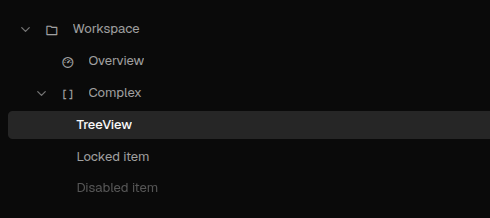
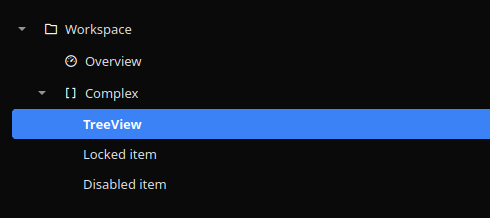
For navigation trees, set click_action to nav, put type: "nav" on navigable nodes, and then set path to the target route. The type: "nav" marker keeps route paths distinct from implicit data-model bindings and is required for structural navigation payloads that carry path. Set select_action when you also need to inspect the selected node or show a selection payload.
from democrai.sdk.client import active_sdk as sdk
from democrai.sdk.ui import bound

nodes = [
    {
        "id": "workspace",
        "label": "Workspace",
        "expanded": True,
        "selectable": False,
        "children": [
            {
                "id": "overview",
                "type": "nav",
                "label": "Overview",
                "path": "/components/index",
                "value": "overview",
            },
            {
                "id": "treeview",
                "type": "nav",
                "label": "TreeView",
                "path": "/components/_complex/treeview",
                "value": "treeview",
            },
            {
                "id": "locked",
                "label": "Locked item",
                "selectable": False,
            },
            {
                "id": "disabled",
                "label": "Disabled item",
                "disabled": True,
            },
        ],
    }
]

tree = sdk.ui.TreeView(
    "tree_navigation",
    nodes=nodes,
    click_action="nav",
    select_action="components.treeview_test_select",
    params={"source": "python_static"},
    expand_all=False,
    click_mode="single",
    selection_mode="single",
    active_id="treeview",
)
tree.set_property("active_as_selection", True)
tree.set_show_if({
    "conditions": [
        {
            "left": bound.store("/components_test/treeview/show", scope="page", default=True),
            "op": "==",
            "right": True,
        }
    ]
})
tree.set_hide_if({
    "conditions": [
        {
            "left": bound.store("/components_test/treeview/hide", scope="page", default=False),
            "op": "==",
            "right": True,
        }
    ]
})
tree.set_required_permissions(["components.complex.view"])
tree.allow("nodes.set", "active_id.set")
- kind: TreeView
id: tree_navigation
nodes:
- id: workspace
label: Workspace
expanded: true
selectable: false
children:
- id: overview
type: nav
label: Overview
path: /components/index
value: overview
- id: treeview
type: nav
label: TreeView
path: /components/_complex/treeview
value: treeview
- id: locked
label: Locked item
selectable: false
- id: disabled
label: Disabled item
disabled: true
click_action: nav
select_action: components.treeview_test_yaml_select
params: {source: yaml_static}
expand_all: false
click_mode: single
selection_mode: single
active_id: treeview
active_as_selection: true
required_permissions: [components.complex.view]
show_if:
conditions:
- left: {type: store, scope: page, path: /components_test/treeview/show, default: true}
op: "=="
right: true
hide_if:
conditions:
- left: {type: store, scope: page, path: /components_test/treeview/hide, default: false}
op: "=="
right: true
capabilities: [nodes.set, active_id.set]select_action receives selected_items and active_id. Each selected item includes the node id, label, value, path, and meta when present. With selection_mode: multiple, selected_items contains all selected nodes.
Action Confirmation
Use click_action.confirm or select_action.confirm to ask for confirmation before dispatch. Confirmation text should use translation keys. When a select_action confirmation is cancelled, the selection remains on the previous confirmed value.
tree = sdk.ui.TreeView(
    "tree_confirm",
    nodes=nodes,
    click_action={
        "name": "components.treeview_confirm_action",
        "context": {"source": "python_tree_click"},
        "confirm": {
            "text": sdk.i18n.t("components.treeview.confirm.click_prompt"),
            "confirm_text": sdk.i18n.t("components.treeview.confirm.accept"),
            "cancel_text": sdk.i18n.t("components.treeview.confirm.cancel"),
        },
    },
    expand_all=True,
    click_mode="single",
    selection_mode="none",
)
- kind: TreeView
id: tree_confirm
nodes:
- id: root
label: Confirmable nodes
expanded: true
selectable: false
children:
- id: alpha
label: Alpha node
- id: beta
label: Beta node
select_action:
name: components.treeview_confirm_action
context:
source: yaml_tree_select
confirm:
text: "@t/components.treeview.confirm.select_prompt"
confirm_text: "@t/components.treeview.confirm.accept"
cancel_text: "@t/components.treeview.confirm.cancel"
expand_all: true
click_mode: none
selection_mode: singleSelection Modes
Use selection_mode: single when one node should be selected at a time. Use multiple for multi-select trees. Use none for pure navigation trees.
click_mode: none disables click activation while keeping selection available. This is useful for picker trees where selecting nodes should not navigate.
Binding and Updates
The demo binds nodes, active_id, expand_all, click_mode, and selection_mode through both page store and surface data model. It updates nodes and active_id directly with propertyUpdate.
store_tree = sdk.ui.TreeView(
    "tree_store",
    nodes=bound.store("/components_test/treeview/nodes", scope="page", default=nodes),
    click_action="nav",
    select_action="components.treeview_test_select",
    expand_all=bound.store("/components_test/treeview/expand_all", scope="page", default=False),
    click_mode=bound.store("/components_test/treeview/click_mode", scope="page", default="single"),
    selection_mode=bound.store("/components_test/treeview/selection_mode", scope="page", default="single"),
    active_id=bound.store("/components_test/treeview/active_id", scope="page", default="treeview"),
)

data_tree = sdk.ui.TreeView(
    "tree_data",
    nodes=bound.data("/components_test/treeview_model/nodes", default=nodes),
    click_action="nav",
    select_action="components.treeview_test_select",
    expand_all=bound.data("/components_test/treeview_model/expand_all", default=False),
    click_mode=bound.data("/components_test/treeview_model/click_mode", default="single"),
    selection_mode=bound.data("/components_test/treeview_model/selection_mode", default="single"),
    active_id=bound.data("/components_test/treeview_model/active_id", default="treeview"),
)

live_tree = sdk.ui.TreeView(
    "tree_live",
    nodes=nodes,
    click_action="nav",
    select_action="components.treeview_test_select",
    active_id="treeview",
)
live_tree.allow("nodes.set", "active_id.set")
- kind: TreeView
id: tree_store
nodes: {type: store, scope: page, path: /components_test/treeview/nodes, default: []}
click_action: nav
select_action: components.treeview_test_yaml_select
expand_all: {type: store, scope: page, path: /components_test/treeview/expand_all, default: false}
click_mode: {type: store, scope: page, path: /components_test/treeview/click_mode, default: single}
selection_mode: {type: store, scope: page, path: /components_test/treeview/selection_mode, default: single}
active_id: {type: store, scope: page, path: /components_test/treeview/active_id, default: treeview}
- kind: TreeView
id: tree_data
nodes: "@data/components_test/treeview_model/nodes"
click_action: nav
select_action: components.treeview_test_yaml_select
expand_all: "@data/components_test/treeview_model/expand_all"
click_mode: "@data/components_test/treeview_model/click_mode"
selection_mode: "@data/components_test/treeview_model/selection_mode"
active_id: "@data/components_test/treeview_model/active_id"
- kind: TreeView
id: tree_live
nodes: []
click_action: nav
select_action: components.treeview_test_yaml_select
active_id: treeview
capabilities: [nodes.set, active_id.set]Runtime updates must target the current surface:
surface_id = ctx["_surface_id"]

return sdk.effects.respond(
    sdk.effects.ui_messages([
        {
            "stateUpdate": {
                "scope": "page",
                "values": {
                    "/components_test/treeview/nodes": next_nodes,
                    "/components_test/treeview/active_id": "collapsible",
                    "/components_test/treeview/expand_all": True,
                    "/components_test/treeview/click_mode": "single",
                    "/components_test/treeview/selection_mode": "multiple",
                },
            }
        },
        sdk.ui.Builder.build_data_model_update_payload(
            surface_id=surface_id,
            data={
                "components_test": {
                    "treeview_model": {
                        "nodes": next_nodes,
                        "active_id": "collapsible",
                        "expand_all": True,
                        "click_mode": "single",
                        "selection_mode": "multiple",
                    }
                }
            },
        ),
    ]),
    sdk.effects.ui_property_update("tree_live", "nodes", next_nodes, surface_id=surface_id),
    sdk.effects.ui_property_update("tree_live", "active_id", "collapsible", surface_id=surface_id),
)
Active State
Use active_id when the active node is known by id. Use active_as_selection: true when the active node should also appear selected.
Use a node-level active rule when active state should be computed from store or data-model values. Active branches stay expanded so the active node remains visible.
Screenshots
Desktop:
Web: