
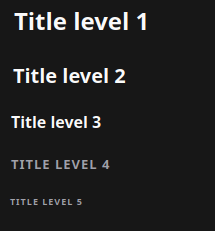
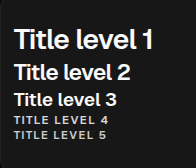
Title renders semantic headings for pages, sections, and grouped content. Use it for visible hierarchy, not for paragraph copy.
Python Contract
sdk.ui.Title(
    id: str,
    text: Any,
    level: Any = 3,
)
text and level accept literal values, store bindings, and data-model bindings from the constructor.
Supported Properties
| Property | Type | Required | Python | YAML | Desktop | Web | Notes |
|---|---|---|---|---|---|---|---|
id |
str |
yes | yes | yes | yes | yes | Stable component id |
text |
scalar or binding | yes | constructor / text.set |
yes | yes | yes | Heading text |
level |
int or binding | no | constructor / level.set |
yes | yes | yes | Renderers clamp visual output to levels 1..5 |
align |
str or binding | no | set_property / align.set |
yes | yes | yes | left, center, right |
style |
str | no | yes | yes | yes | yes | Inline style string |
show_if |
rule | no | yes | yes | yes | yes | Generic visibility contract |
hide_if |
rule | no | yes | yes | yes | yes | Generic visibility contract |
required_permissions |
list[str] | no | yes | yes | yes | yes | Generic permission gate |
Binding Paths
The component test page uses these paths:
- Store:
/components_test/title/text,/components_test/title/level - Data model:
/components_test/title_model/text,/components_test/title_model/level - Visibility store:
/components_test/visibility/title_show,/components_test/visibility/title_hide
Static Example
builder.add(
    sdk.ui.Title(
        "components_test_title_static",
        "Static title",
        level=2,
    )
)
- kind: Title
id: components_test_title_yaml_static
text: "Static title"
level: 2Store Binding Example
from democrai.sdk.ui import bound

builder.add(
    sdk.ui.Title(
        "components_test_title_store",
        bound.store(
            "/components_test/title/text",
            scope="page",
            default="Store-bound title",
        ),
        level=bound.store(
            "/components_test/title/level",
            scope="page",
            default=2,
        ),
    )
)
- kind: Title
id: components_test_title_yaml_store
text:
type: store
scope: page
path: /components_test/title/text
default: "Store-bound title"
level:
type: store
scope: page
path: /components_test/title/level
default: 2Data Model Binding Example
builder.add(
    sdk.ui.Title(
        "components_test_title_data",
        bound.data(
            "/components_test/title_model/text",
            default="Data-model title",
        ),
        level=bound.data(
            "/components_test/title_model/level",
            default=3,
        ),
    )
)
- kind: Title
id: components_test_title_yaml_data
text: "@data/components_test/title_model/text"
level: "@data/components_test/title_model/level"Runtime Property Update Example
builder.add(
    sdk.ui.Title(
        "components_test_title_live",
        "Runtime title",
        level=3,
    ).allow("text.set", "level.set")
)

builder.add(
    sdk.ui.Button(
        "components_test_title_set_alt_btn",
        "Set alternate",
        action="components.content_test_set",
        params={"component": "title", "state_key": "alternate"},
        variant="default",
    )
)
- kind: Title
id: components_test_title_yaml_live
text: "Runtime title"
level: 3
capabilities: [text.set, level.set]
- kind: Button
id: components_test_title_yaml_set_alt_btn
label: "Set alternate"
variant: default
action: components.content_test_set
params: {component: title, state_key: alternate}The action updates store-bound values, data-model values, and direct properties on the live Python and YAML components:
surface_id = str(ctx.get("_surface_id") or "main").strip() or "main"
return sdk.effects.respond(
    sdk.effects.ui_property_update(
        "components_test_title_live",
        "text",
        "Updated runtime title",
        surface_id=surface_id,
    ),
    sdk.effects.ui_property_update(
        "components_test_title_live",
        "level",
        2,
        surface_id=surface_id,
    ),
)
Visibility And Permissions Example
title = sdk.ui.Title(
    "components_test_title_show_if",
    "show_if visible",
    level=4,
)
title.set_show_if({
    "conditions": [
        {
            "left": bound.store(
                "/components_test/visibility/title_show",
                scope="page",
                default=True,
            ),
            "op": "==",
            "right": True,
        }
    ]
})
builder.add(title)

gated = sdk.ui.Title(
    "components_test_title_required_permissions",
    "required_permissions gate",
    level=4,
)
gated.set_required_permissions(["components.content.visibility"])
builder.add(gated)
- kind: Title
id: components_test_title_yaml_show_if
text: "show_if visible"
level: 4
show_if:
conditions:
- left:
type: store
scope: page
path: /components_test/visibility/title_show
default: true
op: "=="
right: true
- kind: Title
id: components_test_title_yaml_hide_if
text: "hide_if visible"
level: 4
hide_if:
conditions:
- left:
type: store
scope: page
path: /components_test/visibility/title_hide
default: false
op: "=="
right: true
- kind: Title
id: components_test_title_yaml_required_permissions
text: "required_permissions gate"
level: 4
required_permissions: [components.content.visibility]Use an action to change the store flags observed by show_if and hide_if:
return sdk.effects.respond(
    sdk.effects.ui_messages([
        {
            "stateUpdate": {
                "scope": "page",
                "values": {
                    "/components_test/visibility/title_show": False,
                },
            }
        }
    ])
)
Rendered Output
Desktop
Web
Usage Guidance
- Use
Titlefor page and section headings. - Bind
textandlevelfrom the constructor when the heading follows store or data-model state. - Declare
text.setandlevel.setcapabilities when direct property updates target the component. - Use
show_if,hide_if, andrequired_permissionsfor visibility and authorization gates.