
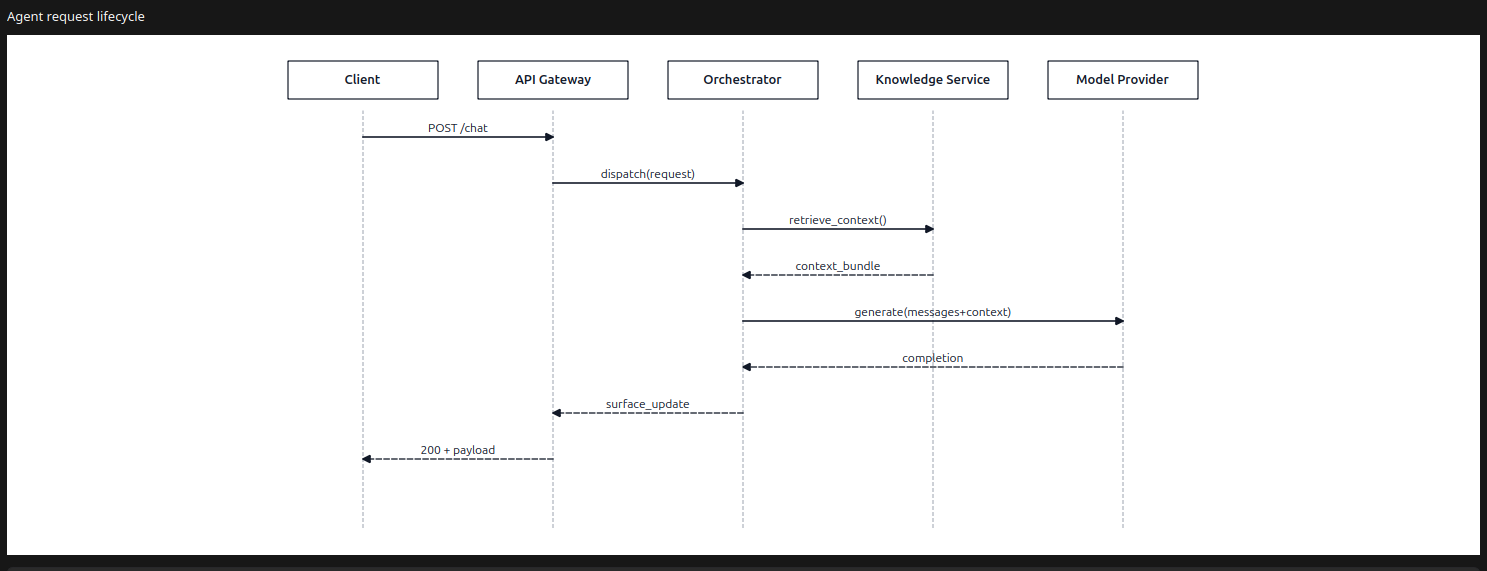
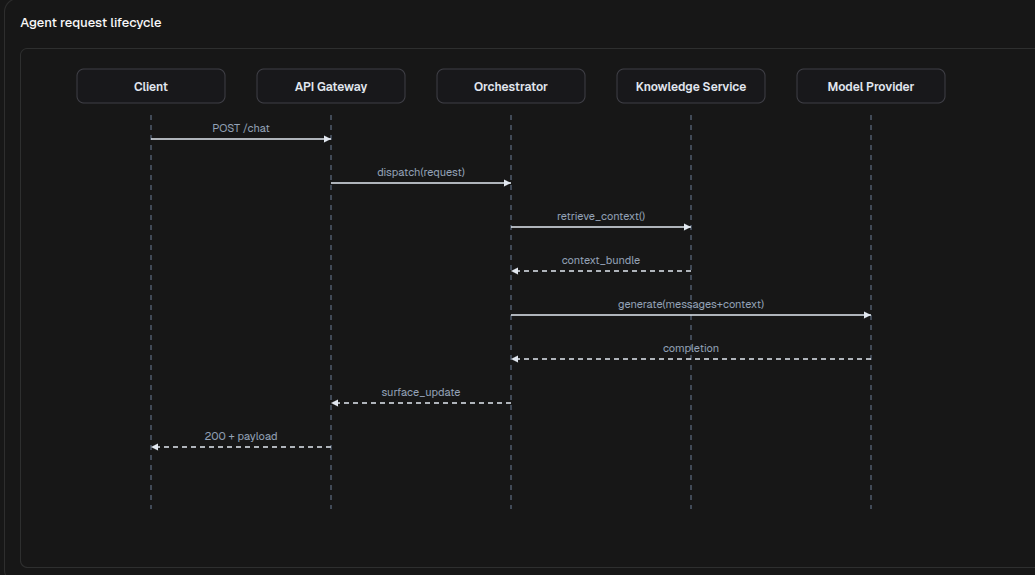
SequenceDiagram renders message exchanges between participants. Use it for request lifecycles, agent orchestration flows, service interactions, approval hand-offs, and other ordered communication timelines.
Python Contract
sdk.ui.SequenceDiagram(
    id: str,
    *,
    participants: list[dict[str, Any]] | None = None,
    messages: list[dict[str, Any]] | None = None,
    mermaid: str = "",
    title: str = "",
    height: int = 360,
)
Supported Properties
| Property | Type | Required | Python | YAML | Desktop | Web | Notes |
|---|---|---|---|---|---|---|---|
id |
str |
yes | yes | yes | yes | yes | Stable component id |
participants |
list[object] |
no | yes | yes | yes | yes | Explicit participant list |
messages |
list[object] |
no | yes | yes | yes | yes | Explicit message list |
mermaid |
str |
no | yes | yes | yes | yes | SequenceDiagram Mermaid input |
title |
str |
no | yes | yes | yes | yes | Optional title above the diagram |
height |
int |
no | yes | yes | yes | yes | Minimum visual height |
style |
str |
no | yes | yes | yes | yes | Apply container-level styling |
show_if |
rule | no | yes | yes | yes | yes | Generic visibility contract |
hide_if |
rule | no | yes | yes | yes | yes | Generic visibility contract |
required_permissions |
list[str] |
no | yes | yes | yes | yes | Generic visibility contract |
Participant Shape
Each participant entry can provide:
id: stable participant identifierlabel: visible participant label
The renderer also tolerates name in participant objects, but for authoring use id and label.
Message Shape
Each message entry can provide:
from: source participant idto: target participant idtext: visible message labeltype:syncorreply
The renderers also accept source and target as aliases for from and to.
Input Modes
SequenceDiagram supports two authoring modes.
- Structured mode with
participantsandmessages - Mermaid mode with a
sequenceDiagramdefinition inmermaid
When structured data is present, that data is rendered directly. When it is omitted, the component reads the Mermaid sequence definition.
Structured Example
diagram = sdk.ui.SequenceDiagram(
    "agent_request_lifecycle",
    title="Agent request lifecycle",
    participants=[
        {"id": "client", "label": "Client"},
        {"id": "gateway", "label": "API Gateway"},
        {"id": "orchestrator", "label": "Orchestrator"},
        {"id": "knowledge", "label": "Knowledge Service"},
        {"id": "llm", "label": "Model Provider"},
    ],
    messages=[
        {"from": "client", "to": "gateway", "text": "POST /chat", "type": "sync"},
        {"from": "gateway", "to": "orchestrator", "text": "dispatch(request)", "type": "sync"},
        {"from": "orchestrator", "to": "knowledge", "text": "retrieve_context()", "type": "sync"},
        {"from": "knowledge", "to": "orchestrator", "text": "context_bundle", "type": "reply"},
        {"from": "orchestrator", "to": "llm", "text": "generate(messages+context)", "type": "sync"},
        {"from": "llm", "to": "orchestrator", "text": "completion", "type": "reply"},
        {"from": "orchestrator", "to": "gateway", "text": "surface_update", "type": "reply"},
        {"from": "gateway", "to": "client", "text": "200 + payload", "type": "reply"},
    ],
    height=520,
)
- kind: SequenceDiagram
id: agent_request_lifecycle
title: "Agent request lifecycle"
height: 520
participants:
- id: client
label: "Client"
- id: gateway
label: "API Gateway"
- id: orchestrator
label: "Orchestrator"
- id: knowledge
label: "Knowledge Service"
- id: llm
label: "Model Provider"
messages:
- from: client
to: gateway
text: "POST /chat"
type: sync
- from: gateway
to: orchestrator
text: "dispatch(request)"
type: sync
- from: orchestrator
to: knowledge
text: "retrieve_context()"
type: sync
- from: knowledge
to: orchestrator
text: "context_bundle"
type: reply
- from: orchestrator
to: llm
text: "generate(messages+context)"
type: sync
- from: llm
to: orchestrator
text: "completion"
type: reply
- from: orchestrator
to: gateway
text: "surface_update"
type: reply
- from: gateway
to: client
text: "200 + payload"
type: replyDesktop rendering:
Web rendering:
Mermaid Example
diagram = sdk.ui.SequenceDiagram(
    "agent_request_lifecycle_mermaid",
    title="Mermaid sequence input",
    mermaid=\"\"\"
sequenceDiagram
    participant Client
    participant Gateway as API_Gateway
    participant Orchestrator
    participant LLM
    Client->>Gateway: POST /chat
    Gateway->>Orchestrator: dispatch(request)
    Orchestrator->>LLM: generate(messages)
    LLM-->>Orchestrator: completion
    Orchestrator-->>Gateway: surface_update
    Gateway-->>Client: 200 + payload
\"\"\",
    height=420,
)
- kind: SequenceDiagram
id: agent_request_lifecycle_mermaid
title: "Mermaid sequence input"
height: 420
mermaid: |
sequenceDiagram
participant Client
participant Gateway as API_Gateway
participant Orchestrator
participant LLM
Client->>Gateway: POST /chat
Gateway->>Orchestrator: dispatch(request)
Orchestrator->>LLM: generate(messages)
LLM-->>Orchestrator: completion
Orchestrator-->>Gateway: surface_update
Gateway-->>Client: 200 + payloadBinding And Runtime Updates
title, participants, and messages can be bound to the page store or to the surface data model. Direct runtime updates should target the same properties with propertyUpdate.
from democrai.sdk.ui import bound

diagram = sdk.ui.SequenceDiagram("components_test_sequence_store", height=320)
diagram.set_property(
    "title",
    bound.store("/components_test/sequence/title", scope="page", default="Request lifecycle"),
)
diagram.set_property(
    "participants",
    bound.store("/components_test/sequence/participants", scope="page", default=[]),
)
diagram.set_property(
    "messages",
    bound.store("/components_test/sequence/messages", scope="page", default=[]),
)

data_diagram = sdk.ui.SequenceDiagram("components_test_sequence_data", height=320)
data_diagram.set_property(
    "participants",
    bound.data("/components_test/sequence_model/participants", default=[]),
)

live_diagram = sdk.ui.SequenceDiagram(
    "components_test_sequence_live",
    title="Request lifecycle",
    participants=[],
    messages=[],
    height=320,
).allow("title.set", "participants.set", "messages.set")
- kind: SequenceDiagram
id: components_test_sequence_yaml_store
title:
type: store
scope: page
path: /components_test/sequence/title
default: "Request lifecycle"
participants:
type: store
scope: page
path: /components_test/sequence/participants
default: []
messages:
type: store
scope: page
path: /components_test/sequence/messages
default: []
height: 320
- kind: SequenceDiagram
id: components_test_sequence_yaml_data
participants:
type: data
path: components_test/sequence_model/participants
default: []
messages:
type: data
path: components_test/sequence_model/messages
default: []
height: 320
- kind: SequenceDiagram
id: components_test_sequence_yaml_live
title: "Request lifecycle"
participants: []
messages: []
height: 320
capabilities:
- title.set
- participants.set
- messages.setVisibility And Permissions
show_if and hide_if are evaluated at the first render and when their bound values change. Visibility rules use mode: "AND" by default; declare mode: "OR" when any condition can make the rule pass. required_permissions gates the component on the current user permissions; super and admin roles bypass the permission list.
from democrai.sdk.ui import bound

diagram = sdk.ui.SequenceDiagram(
    "components_test_sequence_show_if",
    title="show_if visible",
    participants=[],
    messages=[],
    height=300,
).set_show_if({
    "mode": "AND",
    "conditions": [{
        "left": bound.store(
            "/components_test/visibility/sequence_show",
            scope="page",
            default=True,
        ),
        "op": "==",
        "right": True,
    }]
})

hidden_diagram = sdk.ui.SequenceDiagram(
    "components_test_sequence_hide_if",
    title="hide_if not hidden",
    participants=[],
    messages=[],
    height=300,
).set_hide_if({
    "mode": "AND",
    "conditions": [{
        "left": bound.store(
            "/components_test/visibility/sequence_hide",
            scope="page",
            default=False,
        ),
        "op": "==",
        "right": True,
    }]
})

permission_diagram = sdk.ui.SequenceDiagram(
    "components_test_sequence_required_permissions",
    title="required_permissions gate",
    participants=[],
    messages=[],
    height=300,
).set_required_permissions(["components.diagram.visibility"])
- kind: SequenceDiagram
id: components_test_sequence_yaml_show_if
title: "show_if visible"
participants: []
messages: []
height: 300
show_if:
mode: AND
conditions:
- left:
type: store
scope: page
path: /components_test/visibility/sequence_show
default: true
op: "=="
right: true
- kind: SequenceDiagram
id: components_test_sequence_yaml_hide_if
title: "hide_if not hidden"
participants: []
messages: []
height: 300
hide_if:
mode: AND
conditions:
- left:
type: store
scope: page
path: /components_test/visibility/sequence_hide
default: false
op: "=="
right: true
- kind: SequenceDiagram
id: components_test_sequence_yaml_required_permissions
title: "required_permissions gate"
participants: []
messages: []
height: 300
required_permissions:
- components.diagram.visibilityUsage Guidance
- Use structured mode when your module already owns participants and messages as data.
- Use Mermaid mode when the sequence is easier to maintain as a compact text definition.
- Use
type: replyfor response messages so the rendered arrow style matches the exchange semantics. - Keep participant ids stable across messages so the lifelines stay consistent.