Purpose
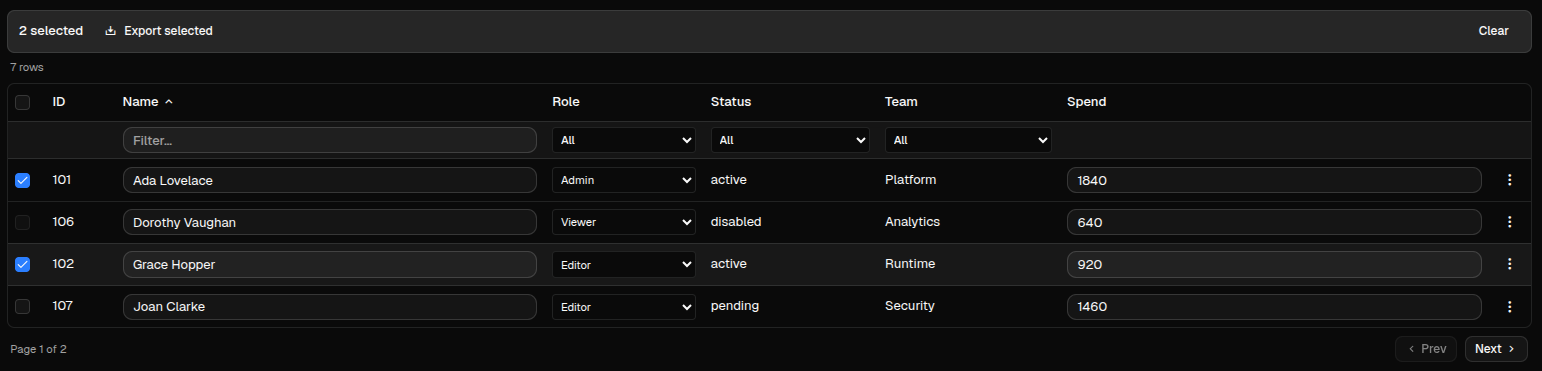
DataTable renders model-driven tabular data with pagination, filters, sorting, inline edits, row actions, selection actions, and remote loading.
Use it for data that has a stable column schema and may grow beyond a small inline list. For non-trivial datasets, prefer remote_service so the table can request only the current page and keep filter/sort state in the client.
Constructor
DataTable(
    id: str,
    model: list[dict] | None = None,
    rows: list[dict] | None = None,
    page: int = 0,
    page_size: int = 25,
    total_rows: int = 0,
    remote_service: str | dict | None = None,
    pagination: bool | None = None,
    on_page_change: str | None = None,
    on_cell_edit: str | None = None,
    on_row_add: str | None = None,
    on_row_delete: str | None = None,
    on_filter_change: str | None = None,
    show_row_numbers: bool = False,
    selectable: bool = False,
    row_actions: list[dict] | None = None,
    selection_actions: list[dict] | None = None,
    paginated: bool = True,
    virtual: bool = False,
    auto_refresh: int | None = None,
    sort_field: str | None = None,
    sort_direction: str = "asc",
)Properties
| Property | Type | Default | Description |
|---|---|---|---|
model |
list[ColumnDef] |
[] |
Column contract. Each column reads a field from each row. |
rows |
list[dict] |
[] |
Current rows rendered by the table. |
page |
int |
0 |
Zero-based current page. |
page_size |
int |
25 |
Rows requested or displayed per page. |
total_rows |
int |
0 |
Total result count across all pages. |
remote_service |
str | dict |
none | Action spec used for initial load, remote pagination, remote filters, remote sorting, and auto-refresh. |
paginated / pagination |
bool |
true |
Shows pagination controls. pagination is accepted as an alias. |
show_row_numbers |
bool |
false |
Adds a row-number column. |
selectable |
bool |
false |
Adds row checkboxes and enables selection_actions. |
row_actions |
list[ActionDef] |
[] |
Per-row menu actions. |
selection_actions |
list[ActionDef] |
[] |
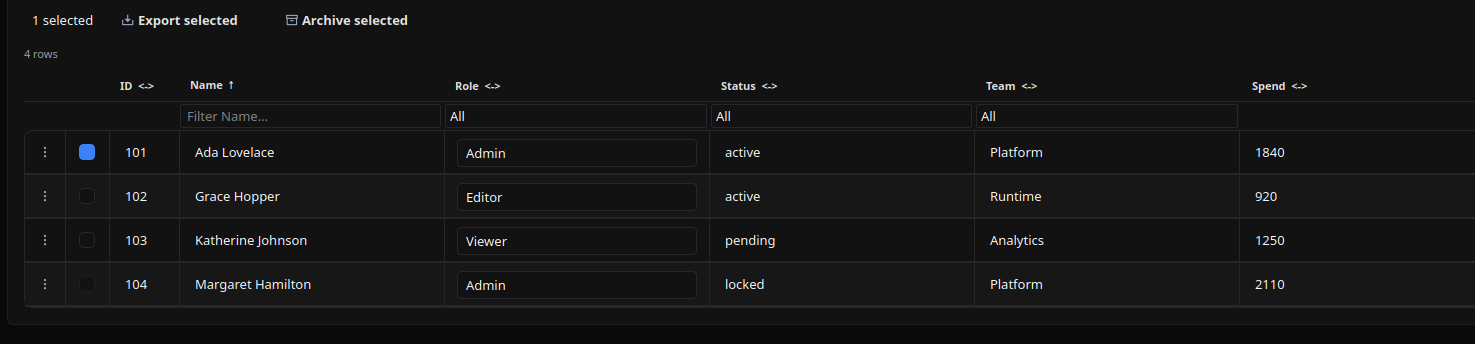
Bulk action buttons shown when at least one row is selected. |
on_cell_edit |
str | dict |
none | Action called after an editable cell changes. |
on_row_add |
str | dict |
none | Action called by the built-in Add row button. |
on_row_delete |
str | dict |
none | Legacy per-row delete action. Prefer row_actions for new tables. |
on_page_change |
str | dict |
none | Action called by pagination when remote_service is not used. |
on_filter_change |
str | dict |
none | Action called by filters when remote_service is not used. |
sort |
dict |
none | Serialized sort state, for example {"field": "name", "direction": "asc"}. |
auto_refresh |
int |
none | Seconds between remote reloads. |
virtual |
bool |
false |
Renderer hint for large tables. |
Python uses sort_field and sort_direction in the constructor; the serialized property is sort. YAML should use sort.
Action Confirmation
Use confirm inside the ActionSpec for user-triggered table actions such as on_row_add, row_actions, selection_actions, and the legacy on_row_delete. Confirmation text should use translation keys.
remote_service, pagination, filter, sort, auto-refresh, and on_cell_edit dispatch without confirmation because they are data loading or cell-edit synchronization flows.
table = sdk.ui.DataTable(
    "datatable_confirm",
    model=model,
    rows=rows,
    paginated=False,
    selectable=True,
    on_row_add={
        "name": "components.datatable_confirm_action",
        "context": {"source": "python_datatable_add", "operation": "add"},
        "confirm": {
            "text": sdk.i18n.t("components.datatable.confirm.add_prompt"),
            "confirm_text": sdk.i18n.t("components.datatable.confirm.accept"),
            "cancel_text": sdk.i18n.t("components.datatable.confirm.cancel"),
        },
    },
    row_actions=[
        {
            "label": sdk.i18n.t("components.datatable.confirm.row_action"),
            "action": {
                "name": "components.datatable_confirm_action",
                "context": {"source": "python_datatable_row", "operation": "inspect"},
                "confirm": {
                    "text": sdk.i18n.t("components.datatable.confirm.row_prompt"),
                    "confirm_text": sdk.i18n.t("components.datatable.confirm.accept"),
                    "cancel_text": sdk.i18n.t("components.datatable.confirm.cancel"),
                },
            },
        }
    ],
    selection_actions=[
        {
            "label": sdk.i18n.t("components.datatable.confirm.selection_action"),
            "variant": "danger",
            "action": {
                "name": "components.datatable_confirm_action",
                "context": {"source": "python_datatable_selection", "operation": "archive"},
                "confirm": {
                    "text": sdk.i18n.t("components.datatable.confirm.selection_prompt"),
                    "confirm_text": sdk.i18n.t("components.datatable.confirm.accept"),
                    "cancel_text": sdk.i18n.t("components.datatable.confirm.cancel"),
                },
            },
        }
    ],
)
- kind: DataTable
id: datatable_confirm
paginated: false
selectable: true
on_row_add:
name: components.datatable_confirm_action
context:
source: yaml_datatable_add
operation: add
confirm:
text: "@t/components.datatable.confirm.add_prompt"
confirm_text: "@t/components.datatable.confirm.accept"
cancel_text: "@t/components.datatable.confirm.cancel"
row_actions:
- label: "@t/components.datatable.confirm.row_action"
action:
name: components.datatable_confirm_action
context:
source: yaml_datatable_row
operation: inspect
confirm:
text: "@t/components.datatable.confirm.row_prompt"
confirm_text: "@t/components.datatable.confirm.accept"
cancel_text: "@t/components.datatable.confirm.cancel"
selection_actions:
- label: "@t/components.datatable.confirm.selection_action"
variant: danger
action:
name: components.datatable_confirm_action
context:
source: yaml_datatable_selection
operation: archive
confirm:
text: "@t/components.datatable.confirm.selection_prompt"
confirm_text: "@t/components.datatable.confirm.accept"
cancel_text: "@t/components.datatable.confirm.cancel"
model:
- {field: id, header: ID, type: int, width: 70, editable: false}
- {field: name, header: Name, type: str, editable: false}
- {field: status, header: Status, type: str, editable: false}
rows:
- {id: 101, name: Ada Lovelace, status: active}
- {id: 102, name: Grace Hopper, status: pending}Column Model
Each column maps one row field to one rendered cell. field is also the key used in filter, sort, edit, row-action, and remote-service payloads, so keep field names stable.
model = [
    {"field": "id", "header": "ID", "type": "int", "width": 70, "editable": False, "sortable": True},
    {"field": "name", "header": "Name", "type": "str", "editable": True, "filterable": True, "filter_type": "text"},
    {"field": "role", "header": "Role", "type": "enum", "editable": True, "filterable": True, "filter_type": "select", "options": ["Admin", "Editor", "Viewer"]},
    {"field": "active", "header": "Active", "type": "bool", "editable": True, "filterable": True, "filter_type": "boolean"},
    {"field": "joined", "header": "Joined", "type": "str", "transform": "date|%Y-%m-%d"},
    {"field": "tags", "header": "Tags", "type": "str", "transform": "join_list|, |upper"},
]
ColumnDef schema:
| Key | Type | Required | Meaning |
|---|---|---|---|
field |
str |
yes | Row key read by the cell. Every rendered row should contain this key. |
header |
str |
yes | Column label shown in the table header. |
type |
str |
no | Cell type. Supported values are str, int, float, bool, and enum. Omitted values behave like str. |
editable |
bool | rule |
no | Enables inline editing. It can be a boolean or a visibility/condition rule evaluated against the current row as $item. |
filterable |
bool |
no | Shows a filter control for the column. |
filter_type |
str |
no | Filter control type. Supported values are text, select, boolean, date, and number. |
options |
list[str] |
no | Values for enum editors and select filters. |
sortable |
bool |
no | Marks the column as sortable for remote sort interactions. |
width |
int |
no | Initial column width hint in pixels. |
transform |
str |
no | Display formatter applied to read-only display text. |
Field Types
type |
Display | Editable control | Edit payload |
|---|---|---|---|
str |
Text, optionally passed through transform. |
Text input. | String from the input. |
int |
Text, optionally passed through transform. |
Text input. | String from the input; validate/cast in the action if needed. |
float |
Text, optionally passed through transform. |
Text input. | String from the input; validate/cast in the action if needed. |
bool |
Disabled checkbox. | Checkbox. | Boolean. |
enum |
Text, optionally passed through transform. |
Select using options. |
Selected option value. |
Filter Types
filter_type |
Control | Filter payload |
|---|---|---|
text |
Text input. | String, or absent/null when cleared. |
select |
Select with All plus options. |
Selected option value, or absent/null when All is selected. |
boolean |
Select with All, Yes, No. |
Boolean, or absent/null when All is selected. |
date |
Text input. | String. The renderer does not parse dates before dispatch. |
number |
Text input. | String. The renderer does not parse numbers before dispatch. |
For client-side filtering, non-boolean filters compare by case-insensitive substring. For remote tables, filter values are sent to remote_service and the backend action owns parsing and matching.
Formatters
transform supports the pipe syntax:
formatter|arg1|arg2|...The old colon syntax is still accepted for date, truncate, and get_stub for compatibility.
| Formatter | Syntax | Input | Output |
|---|---|---|---|
upper |
upper |
Any value | Uppercase string. |
lower |
lower |
Any value | Lowercase string. |
title |
title |
Any value | Title-cased string. |
truncate |
truncate|N |
Any value | String shortened to N characters with ellipsis. Default N is 50. Legacy: truncate:N. |
date |
date|FORMAT |
ISO-like date/datetime string | Formatted date string. Default format is %Y-%m-%d. Legacy: date:FORMAT. |
join_list |
join_list|SEP|INNER |
List of primitive values | Values joined with SEP. Optional INNER applies another formatter to each value. |
join_objects |
join_objects|KEY|SEP|INNER |
List of objects | Extracts KEY from each object, optionally applies INNER, and joins with SEP. |
get_stub |
get_stub|STUB|FIELD |
Lookup key | Reads /stubs/{STUB} from client state, finds a row whose key matches the cell value, and returns FIELD or value. Legacy: get_stub:STUB:FIELD. |
Examples:
model:
  - {field: name, header: Name, type: str, transform: title}
  - {field: description, header: Description, type: str, transform: "truncate|80"}
  - {field: joined, header: Joined, type: str, transform: "date|%Y-%m-%d"}
  - {field: tags, header: Tags, type: str, transform: "join_list|, |upper"}
  - {field: groups, header: Groups, type: str, transform: "join_objects|name|, |title"}
  - {field: owner_id, header: Owner, type: str, transform: "get_stub|users|label"}
Row Data Format
rows is always a list of dictionaries. Each row should have a stable id, one key for each visible column field, and optional metadata such as selectable.
rows = [
    {
        "id": 101,
        "name": "Ada Lovelace",
        "role": "Admin",
        "status": "active",
        "team": "Platform",
        "spend": 1840,
        "selectable": True,
    },
    {
        "id": 104,
        "name": "Margaret Hamilton",
        "role": "Admin",
        "status": "locked",
        "team": "Platform",
        "spend": 2110,
        "selectable": False,
    },
]
The renderer reads row[column["field"]] for each visible cell. Extra row keys are not displayed unless the model declares a matching column, but they are still available to row actions and row visibility rules through $item.
For inline tables, total_rows normally equals len(rows). For remote paginated tables, rows is only the current page and total_rows is the total number of matching records.
Row And Selection Actions
row_actions render a per-row menu. The current row is resolved as the standard action item, so explicit action.context can bind row fields with $item.*.
{"item": row, "item_index": row_index, "tableId": table_id}selection_actions render in a bulk action bar after the user selects at least one row. Each action receives:
{"selected_ids": [...], "selected_rows": [...], "tableId": table_id}Rows should have a stable id. A row can disable selection with selectable: false or with a rule object.
Action visibility uses the same nested-action contract as other components: show_if, hide_if, and required_permissions. Row actions can inspect the current row through $item.<field>. Selection actions do not have a single row item, so use store/data bindings or permissions for their visibility.
Use non-mutating row actions on inline, store-bound, data-model-bound, and direct-update tables unless the action also updates that specific table source. Use mutating row actions such as promote/delete on the remote table that owns the backing data.
Action specs in row, selection, pagination, filter, edit, and remote loading flows must use fully qualified module action names, for example components.test_datatable_remote. See Action Dispatch.
row_actions = [
    {
        "label": "Inspect",
        "icon": "ric.search-eye-line",
        "action": {
            "name": "components.test_datatable_action_event",
            "context": {"op": "inspect", "source": "users_table"},
        },
    },
    {
        "label": "Pending only",
        "icon": "ric.time-line",
        "action": {
            "name": "components.test_datatable_action_event",
            "context": {"op": "pending_only", "source": "users_table"},
        },
        "show_if": {"conditions": [{"left": "$item.status", "op": "==", "right": "pending"}]},
    },
]

selection_actions = [
    {
        "label": "Export selected",
        "icon": "ric.download-2-line",
        "action": {
            "name": "components.test_datatable_action_event",
            "context": {"op": "export_selected", "source": "users_table"},
        },
    },
    {
        "label": "Archive selected",
        "icon": "ric.archive-line",
        "variant": "danger",
        "action": {
            "name": "components.test_datatable_remote_archive_selected",
            "context": {"op": "archive_selected", "source": "users_table"},
        },
        "show_if": {
            "conditions": [
                {
                    "left": bound.store("/components_test/datatable/show_bulk_archive", scope="page", default=True),
                    "op": "==",
                    "right": True,
                }
            ]
        },
        "required_permissions": ["components.datatable.bulk_archive"],
    },
]

table = sdk.ui.DataTable(
    "users_table",
    model=model,
    rows=rows,
    paginated=False,
    show_row_numbers=True,
    selectable=True,
    row_actions=row_actions,
    selection_actions=selection_actions,
    on_cell_edit="components.test_datatable_action_event",
)
- kind: DataTable
id: users_table
show_row_numbers: true
selectable: true
paginated: false
on_cell_edit: components.test_datatable_action_event
row_actions:
- label: Inspect
icon: ric.search-eye-line
action:
name: components.test_datatable_action_event
context: {op: inspect, source: users_table}
- label: Pending only
icon: ric.time-line
action:
name: components.test_datatable_action_event
context: {op: pending_only, source: users_table}
show_if:
conditions:
- left: "$item.status"
op: "=="
right: pending
selection_actions:
- label: Export selected
icon: ric.download-2-line
action:
name: components.test_datatable_action_event
context: {op: export_selected, source: users_table}
- label: Archive selected
icon: ric.archive-line
variant: danger
action:
name: components.test_datatable_remote_archive_selected
context: {op: archive_selected, source: users_table}
show_if:
conditions:
- left: {type: store, scope: page, path: /components_test/datatable/show_bulk_archive, default: true}
op: "=="
right: true
required_permissions: [components.datatable.bulk_archive]
model:
- {field: id, header: ID, type: int, width: 70, editable: false}
- {field: name, header: Name, type: str, editable: true, filterable: true, filter_type: text}
- {field: role, header: Role, type: enum, editable: true, options: [Admin, Editor, Viewer]}
- {field: status, header: Status, type: str, editable: false}
rows:
- {id: 101, name: Ada Lovelace, role: Admin, status: active, selectable: true}
- {id: 103, name: Katherine Johnson, role: Viewer, status: pending, selectable: true}Remote tables can add mutating row actions. These actions should update the backing data and then reload the same table using the tableId received in the payload.
row_actions:
  - label: Promote
    icon: ric.arrow-up-circle-line
    action:
      name: components.test_datatable_remote_promote
      context: {op: promote, source: users_remote}
    show_if:
      conditions:
        - left: "$item.status"
          op: "!="
          right: locked
  - label: Delete
    icon: ric.delete-bin-2-line
    variant: danger
    action:
      name: components.test_datatable_remote_delete
      context: {op: delete, source: users_remote}
    hide_if:
      conditions:
        - left: "$item.status"
          op: "=="
          right: locked
    required_permissions: [components.datatable.delete]
Action payload rules:
| Trigger | Payload added by the table |
|---|---|
row_actions |
item, item_index, tableId |
selection_actions |
selected_ids, selected_rows, tableId |
on_cell_edit |
rowId, rowIndex, field, value, row, tableId |
remote_service |
page, pageSize, filters, sort, sortField, sortDirection, tableId, and optionally autoRefresh |
The action's explicit context is merged before the table payload. Use context for command metadata such as op and source; use $item.* in row action context when a route or command needs values from the current row.
Bindings And Direct Updates
rows, page, page_size, total_rows, sort, and filters are mutable table state. rows also supports collection patches.
store_table = sdk.ui.DataTable(
    "store_table",
    model=model,
    rows=bound.store("/components_test/datatable/store_rows", scope="page", default=rows),
    total_rows=bound.store("/components_test/datatable/store_total", scope="page", default=len(rows)),
    paginated=False,
)

data_table = sdk.ui.DataTable(
    "data_table",
    model=model,
    rows=bound.data("/components_test/datatable_model/rows", default=[]),
    total_rows=bound.data("/components_test/datatable_model/total", default=0),
    paginated=False,
)

live_table = sdk.ui.DataTable("live_table", model=model, rows=rows, total_rows=len(rows), paginated=False)
live_table.allow("rows.set", "rows.append", "rows.remove", "rows.replace", "page.set", "page_size.set", "total_rows.set", "sort.set", "filters.set")

surface_id = ctx["_surface_id"]
sdk.effects.ui_property_update("live_table", "rows", new_rows, action="set", surface_id=surface_id)
sdk.effects.ui_collection_append("live_table", "rows", new_row, surface_id=surface_id)
sdk.effects.ui_collection_replace("live_table", "rows", {"id": row_id, "item": updated_row}, surface_id=surface_id)
sdk.effects.ui_collection_remove("live_table", "rows", {"id": row_id}, surface_id=surface_id)
- kind: DataTable
id: store_table
capabilities: [rows.set, rows.append, rows.remove, rows.replace, page.set, page_size.set, total_rows.set, sort.set, filters.set]
paginated: false
model: *datatable_model
rows: {type: store, scope: page, path: /components_test/datatable/store_rows, default: *datatable_rows}
total_rows: {type: store, scope: page, path: /components_test/datatable/store_total, default: 4}
- kind: DataTable
id: data_table
capabilities: [rows.set, rows.append, rows.remove, rows.replace, page.set, page_size.set, total_rows.set, sort.set, filters.set]
paginated: false
model: *datatable_model
rows: "@data/components_test/datatable_model/rows"
total_rows: "@data/components_test/datatable_model/total"
- kind: Button
id: live_table_append
label: Direct append row
action: components.test_datatable_direct_append
params: {target: live_table}Remote Service
When remote_service is present, the table calls it on initial render and when remote filter, sort, pagination, or auto-refresh state changes.
The action receives:
{
    "page": 0,
    "pageSize": 25,
    "filters": {"status": "active"},
    "sort": {"field": "name", "direction": "asc"},
    "sortField": "name",
    "sortDirection": "asc",
    "tableId": "users_table",
    "autoRefresh": True,  # only on auto-refresh
}
The action should return targeted property updates for rows, page, page_size, total_rows, and optionally sort.
remote_row_actions = [
    *row_actions,
    {
        "label": "Promote",
        "icon": "ric.arrow-up-circle-line",
        "action": {
            "name": "components.test_datatable_remote_promote",
            "context": {"op": "promote", "source": "users_remote"},
        },
        "show_if": {"conditions": [{"left": "$item.status", "op": "!=", "right": "locked"}]},
    },
    {
        "label": "Delete",
        "icon": "ric.delete-bin-2-line",
        "variant": "danger",
        "action": {
            "name": "components.test_datatable_remote_delete",
            "context": {"op": "delete", "source": "users_remote"},
        },
        "hide_if": {"conditions": [{"left": "$item.status", "op": "==", "right": "locked"}]},
        "required_permissions": ["components.datatable.delete"],
    },
]

remote_table = sdk.ui.DataTable(
    "users_remote",
    model=model,
    rows=rows,
    page=0,
    page_size=25,
    total_rows=len(rows),
    remote_service="components.test_datatable_remote_list",
    paginated=True,
    selectable=True,
    row_actions=remote_row_actions,
    selection_actions=selection_actions,
    sort_field="name",
    sort_direction="asc",
)
- kind: DataTable
id: users_remote
page: 0
page_size: 25
total_rows: 4
remote_service: components.test_datatable_remote_list
paginated: true
selectable: true
row_actions:
- label: Promote
icon: ric.arrow-up-circle-line
action:
name: components.test_datatable_remote_promote
context: {op: promote, source: users_remote}
show_if:
conditions:
- left: "$item.status"
op: "!="
right: locked
- label: Delete
icon: ric.delete-bin-2-line
variant: danger
action:
name: components.test_datatable_remote_delete
context: {op: delete, source: users_remote}
hide_if:
conditions:
- left: "$item.status"
op: "=="
right: locked
required_permissions: [components.datatable.delete]
selection_actions: *datatable_selection_actions
sort:
field: name
direction: asc
model: *datatable_model
rows: *datatable_rowsInitial rows are a fallback for the first paint. When remote_service runs, its response should replace rows, page, page_size, total_rows, and optionally sort with authoritative values.
Model CRUD Action
The remote service pattern used by the monitor module is the same pattern to use with model-driven CRUD: read page, pageSize, filters, sort, and tableId from the action context, call module_sdk.models.<model>, then update only the table properties.
This example is intentionally complete. Replace objective_mappings with the writable model owned by the module or platform area you are exposing.
from __future__ import annotations

from typing import Any

from democrai.sdk.decorators import action


def _table_id(ctx: dict[str, Any], default: str = "objective_mappings_table") -> str:
    return str(ctx.get("tableId") or ctx.get("table_id") or default).strip()


def _page(ctx: dict[str, Any]) -> int:
    return max(0, int(ctx.get("page", 0) or 0))


def _page_size(ctx: dict[str, Any]) -> int:
    return max(1, min(int(ctx.get("pageSize", 25) or 25), 200))


def _filters(ctx: dict[str, Any]) -> dict[str, Any]:
    raw = ctx.get("filters") or {}
    if not isinstance(raw, dict):
        return {}
    return {
        str(key): value
        for key, value in raw.items()
        if value is not None and value != ""
    }


def _sort(ctx: dict[str, Any], default_field: str = "name") -> dict[str, str]:
    raw = ctx.get("sort") or {}
    if not isinstance(raw, dict):
        raw = {}
    field = str(raw.get("field") or raw.get("sortField") or default_field).strip()
    direction = str(raw.get("direction") or raw.get("sortDirection") or "asc").lower()
    return {"field": field or default_field, "direction": "desc" if direction == "desc" else "asc"}


def _surface_id(ctx: dict[str, Any]) -> str:
    return str(ctx.get("_surface_id") or "main").strip() or "main"


def _refresh_table(module_sdk, ctx: dict[str, Any]):
    table_id = _table_id(ctx)
    page = _page(ctx)
    page_size = _page_size(ctx)
    filters = _filters(ctx)
    sort = _sort(ctx)

    listing = module_sdk.models.objective_mappings.list(
        page=page,
        page_size=page_size,
        filters=filters,
        sort=sort,
    )
    rows = list(listing.get("rows") or [])
    total_rows = int(listing.get("total_rows") or 0)
    resolved_page = int(listing.get("page") or page)
    resolved_page_size = int(listing.get("page_size") or page_size)
    resolved_sort = dict(listing.get("sort") or sort)
    surface_id = _surface_id(ctx)

    return module_sdk.effects.respond(
        module_sdk.effects.ui_property_update(table_id, "rows", rows, action="set", surface_id=surface_id),
        module_sdk.effects.ui_property_update(table_id, "page", resolved_page, surface_id=surface_id),
        module_sdk.effects.ui_property_update(table_id, "page_size", resolved_page_size, surface_id=surface_id),
        module_sdk.effects.ui_property_update(table_id, "total_rows", total_rows, surface_id=surface_id),
        module_sdk.effects.ui_property_update(table_id, "sort", resolved_sort, surface_id=surface_id),
    )


@action("list_objective_mappings")
async def list_objective_mappings(ctx: dict, session: dict, module_sdk):
    del session
    return _refresh_table(module_sdk, ctx)


@action("create_objective_mapping")
async def create_objective_mapping(ctx: dict, session: dict, module_sdk):
    del session
    payload = {
        "objective": str(ctx.get("objective") or "support_triage"),
        "capability": str(ctx.get("capability") or "chat"),
        "priority": int(ctx.get("priority", 100) or 100),
    }
    module_sdk.models.objective_mappings.create(payload)
    return _refresh_table(module_sdk, {**ctx, "page": 0})


@action("update_objective_mapping")
async def update_objective_mapping(ctx: dict, session: dict, module_sdk):
    del session
    item = dict(ctx.get("item") or {})
    row_id = int(item.get("id") or 0)
    payload = {
        "objective": str(item.get("objective") or ctx.get("objective") or ""),
        "capability": str(item.get("capability") or ctx.get("capability") or ""),
        "priority": int(ctx.get("priority", item.get("priority", 100)) or 100),
    }
    module_sdk.models.objective_mappings.update(row_id, payload)
    return _refresh_table(module_sdk, ctx)


@action("delete_objective_mapping")
async def delete_objective_mapping(ctx: dict, session: dict, module_sdk):
    del session
    item = dict(ctx.get("item") or {})
    row_id = int(item.get("id") or 0)
    module_sdk.models.objective_mappings.delete(row_id)
    return _refresh_table(module_sdk, ctx)


@action("delete_selected_objective_mappings")
async def delete_selected_objective_mappings(ctx: dict, session: dict, module_sdk):
    del session
    for row_id in ctx.get("selected_ids", []):
        module_sdk.models.objective_mappings.delete(int(row_id))
    return _refresh_table(module_sdk, ctx)
Visibility And Permissions
show_if, hide_if, and required_permissions work on the table itself. row_actions and selection_actions can also define their own visibility and permissions.
table.set_show_if({
    "conditions": [
        {
            "left": bound.store("/components_test/datatable/show", scope="page", default=True),
            "op": "==",
            "right": True,
        }
    ]
})
table.set_hide_if({
    "conditions": [
        {
            "left": bound.store("/components_test/datatable/hide", scope="page", default=False),
            "op": "==",
            "right": True,
        }
    ]
})
table.set_required_permissions(["components.datatable.view"])
- kind: DataTable
id: permission_table
required_permissions: [components.datatable.view]
show_if:
conditions:
- left: {type: store, scope: page, path: /components_test/datatable/show, default: true}
op: "=="
right: true
hide_if:
conditions:
- left: {type: store, scope: page, path: /components_test/datatable/hide, default: false}
op: "=="
right: true
model: *datatable_model
rows: []Mutable Capabilities
| Capability | Effect |
|---|---|
rows.set |
Replaces the rendered row list. |
rows.append |
Appends one row. |
rows.remove |
Removes a row by collection patch value, usually {"id": row_id}. |
rows.replace |
Replaces one row by collection patch value. |
page.set |
Updates the current page. |
page_size.set |
Updates the page size. |
total_rows.set |
Updates the total result count. |
sort.set |
Updates the sort state. |
filters.set |
Updates the filter state. |
visible.set |
Updates common runtime visibility. |
DataTable exposes row collection and pagination capabilities by default. Declare capabilities explicitly in YAML when using direct runtime updates in examples or tests.
Screenshots
Desktop rendering:
Web rendering: